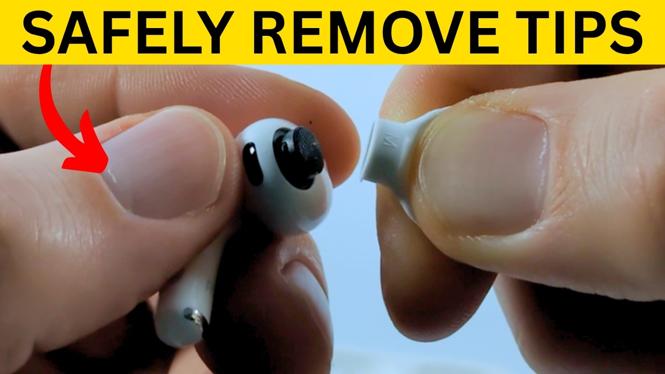
You can change AirPods Pro 3 ear tips without pulling on the soft silicone or using any tools. The important part is to grip the ear tip at its oval base, where it attaches to the earbud. Pulling from that point lets the tip release from its connector instead of stretching the soft outer section.
This is useful when you need a different size, want to clean a removed tip, or have a tip that is not seated correctly. AirPods Pro 3 ear tips are clicked into place, so they come off and go back on with a firm, controlled pull or press.
Video Tutorial
Know where to hold the ear tip
Before removing an ear tip, look at the attachment area. The base is oval, not circular. That oval section is the part that connects to the AirPods Pro 3 earbud.
Do not grab only the thin, soft end of the ear tip and yank it away from the earbud. Instead, unfold the ear tip first. This moves the soft silicone section upward and exposes the firmer base more clearly. You may also see the ear tip size printed on one side after folding it back.
Holding the base gives you control and helps you avoid putting unnecessary force on the soft section of the tip.
Remove an AirPods Pro 3 ear tip
- Hold one AirPods Pro 3 earbud securely in one hand.
- Fold or unfold the soft ear tip upward so the base is easier to access.
- Locate the oval attachment point at the base of the ear tip.
- Press and hold the ear tip firmly at that oval base.
- Pull the tip straight off the earbud with a firm, steady motion.
The ear tip is not permanently attached. It is simply clicked into place, so it should release once you pull from the oval connection point. If it does not come off immediately, keep your grip at the base and use steady pressure rather than pulling harder on the soft outer edge.
After it is removed, set the ear tip aside. You can replace it with another size or remove it for cleaning before putting it back on.
Choose the right ear tip size
The size marking is visible on the side of the ear tip once you fold the soft section upward. AirPods Pro 3 ear tips range from XXS to L. Check the marking on your current tip before switching so you know which size you are using.
A different size can change how the earbuds feel and how well they seal in your ears. If your current tips feel uncomfortable or do not create a good seal, try another available size. The goal is a comfortable fit that stays in place and supports noise cancellation.
Keep the left and right earbud tips consistent if you want to start with the same fit on both sides. If one ear needs a different size for comfort or a better seal, use the size that fits that ear best. Check the printed marking on each tip so you know what is installed.
Attach the replacement ear tip
- Hold the replacement ear tip with its oval base facing the AirPods Pro 3 earbud.
- Line up the oval opening in the tip with the oval connection point on the earbud.
- Press the ear tip onto the connector.
- Push until the tip clicks securely into place.
- Check that the ear tip sits evenly on the earbud and is not loose.
The replacement tip attaches in the same area where the old one was removed. Aligning the oval shape first matters because the connector is not round. Once it is positioned correctly, press it on until you feel or hear it click into place.
Do not leave a tip partially attached. A properly installed ear tip should be secure at the base. If it looks uneven or feels loose, remove it by gripping the oval base, then line it up again and press it back into place.
Quick checks before using your earbuds
Repeat the process for the other AirPods Pro 3 earbud if needed. Confirm that both ear tips are fully clicked on and that you selected the intended sizes. Then place the earbuds in your ears and check their comfort.
Changing the ear tips only takes a moment once you know where to grip. Fold the soft section upward, hold the oval base, pull the old tip straight off, and press the new one on until it clicks. This keeps the process simple while protecting the soft ear tip material and the earbud connection.
More AirPods Tips & Tutorials:
 Subscribe Now! 🙂

Discover more from Gauging Gadgets
Subscribe to get the latest posts sent to your email.