Free movie apps you can use on Android
You do not need a subscription to watch movies on your Android phone. Several apps offer full movies, TV shows, and in some cases live TV at no cost. The options shown here include Fandango, Tubi, Fawesome, Sling TV, Plex, and YouTube.
Most of these services show ads during playback. That is how they provide movies for free. You can use them on Samsung Galaxy phones, Google Pixel phones, and other Android devices.
Video Tutorial
Use Fandango for free movies without an account
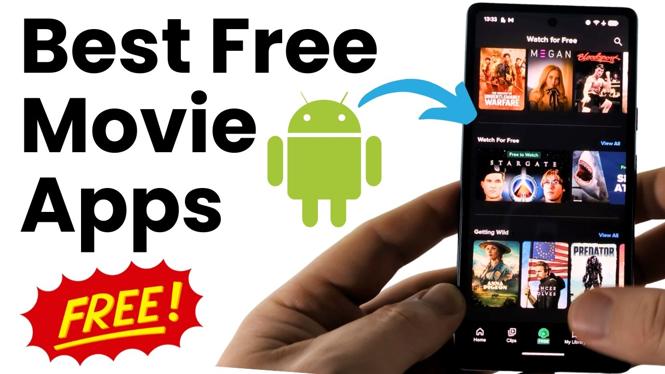
Fandango is a simple place to start because you can browse its free movie catalog without creating an account. Open the app, then use the bottom navigation to get to its free section.
- Open the Fandango app on your Android phone.
- Select Free in the bottom menu.
- Look through the Watch for Free section.
- Select a movie you want to play.
The Watch for Free page includes a large selection of movies. Fandango also has apps for devices such as Roku and Fire Stick if you want to use the service on a TV later.
Browse Tubi movies as a guest
Tubi also lets you watch its free catalog without signing in. When the app first asks you to create an account, you can continue as a guest instead.
- Open Tubi.
- Select Skip in the top-right corner if you do not want to create an account.
- Select Movies at the top of the screen.
- Browse the available titles and choose a movie.
This is useful if you want to start browsing right away. The Movies section lists the free movies available within Tubi, and you can play them without an account.
Check Fawesome for movies and live TV
Fawesome combines free movies with free live TV. Its genre categories make it easier to narrow the list when you already know the kind of movie you want to watch.
- Open Fawesome.
- Browse the movie selections or choose a genre.
- Select a title to start watching.
- Use the live TV area when you want to browse live channels instead of picking a movie.
If scrolling through one large catalog feels slow, the genre breakdown can help you get to comedy, action, or another type of movie faster.
Find the free on-demand section in Sling TV
Sling TV is known for live streaming, but it also includes free on-demand content. You can find the free movie catalog from the app’s on-demand area.
- Open Sling TV.
- Go to On Demand.
- Select Movies.
- Choose a free movie from the list.
There are also free TV shows and a free kids section. This makes Sling TV a good option when different people are sharing the phone or when you want something other than a movie.
Use Plex for free movies, series, and live TV
Plex requires an account, unlike several of the other apps listed here. After you sign in, you can access its free on-demand movies and series, plus its free live TV offering.
- Open Plex and create an account or sign in.
- Select On Demand.
- Select Free to Watch.
- Browse movies or full series, then select what you want to play.
The On Demand area is the place to go for movies and series. Plex also offers free live TV, so you can switch between an on-demand title and live programming in the same app.
Look for free movies inside YouTube
YouTube is another option that is easy to miss. Its Movies and TV area includes officially available movies marked free with ads.
- Open the YouTube app.
- In the top menu, move all the way to the left.
- Select the small icon shown there.
- Select Movies and TV.
- Select Free in the top menu.
- Choose a movie labeled Free with ads.
The free titles in this section are provided through YouTube. If you already use YouTube on your Android phone, this gives you one more place to check before installing another app.
Pick the app that fits what you want to watch
Start with Fandango or Tubi if you want to watch without making an account. Use Fawesome, Sling TV, or Plex when you also want free live TV or more ways to browse. Check YouTube when you want to see its free, ad-supported movie selection.
Open the movie section in a few of these apps and compare their current catalogs. The best choice is the one that has the movie, series, or live channel you want to watch.
More Android Tips & Tutorials:
 Subscribe Now! 🙂

Discover more from Gauging Gadgets
Subscribe to get the latest posts sent to your email.