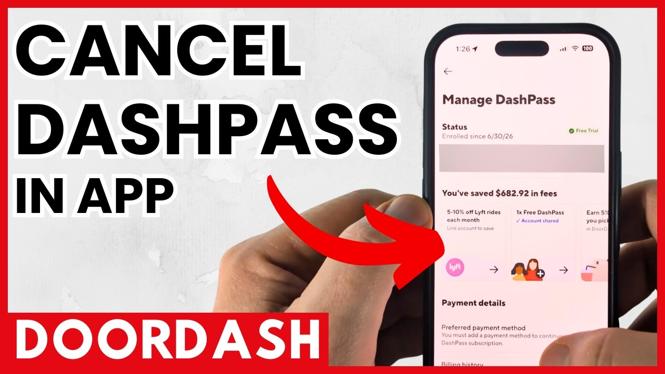
You can cancel a DoorDash DashPass subscription from the DoorDash app on either iPhone or Android. The important part is to finish the cancellation flow and check that your membership no longer shows a future renewal. Starting the process alone does not always mean the cancellation is complete.
This applies to a DashPass free trial and a paid membership. Cancel before the next billing date if your goal is to stop another recurring charge.
Video Tutorial
Cancel DashPass in the DoorDash app
The app is where you can manage your DoorDash subscription settings. The layout can differ slightly between iPhone and Android, or after an app update, so focus on finding the DashPass membership section in your signed-in account rather than relying on one fixed screen position.
- Open the DoorDash app on your iPhone or Android device.
- Make sure you are signed in to the DoorDash account that has DashPass. This matters if you use more than one email address, phone number, or account.
- Go to your account and find the area for subscription settings or your DashPass membership.
- Open the DashPass membership details. Look for the option that lets you manage, end, or cancel the membership.
- Select the cancellation option and continue through each confirmation screen. DoorDash may show details about your plan or ask why you are leaving before it completes the request.
- Read the final screen carefully. Confirm the cancellation only when the app indicates that the recurring membership will not renew.
Do not close the app halfway through the prompts. Keep going until you see a clear confirmation or an updated membership status. If the app returns you to the regular account page without confirming anything, open the DashPass section again and check its status.
Check that recurring billing is stopped
After you cancel, return to the DashPass membership page and review the information shown there. You are looking for a status that confirms the plan is cancelled, ending, or no longer set to renew. Also check for the displayed end date, if DoorDash provides one.
A cancelled membership may still show DashPass access for a period of time. That does not necessarily mean the cancellation failed. The key detail is whether the app says the membership will renew or whether it shows another upcoming charge. Use the status and billing information in your account as the final check.
If you started with a DashPass free trial, use the same check. A trial can turn into a paid plan when it reaches its renewal date, so confirm the trial is set not to continue if you do not want to be billed.
What to do if you cannot find the cancellation option
First, verify that you are in the right DoorDash account. It is easy to sign into a different account and see no DashPass details, especially if you have ordered with another phone number or email in the past.
Next, look through the subscription settings and the DashPass membership page again. The cancellation control may be inside the membership details rather than on the first account screen. Update the DoorDash app if needed, then sign in again and check the membership status.
If DashPass is shown as active but you still cannot complete the cancellation, use the help or support option available in your DoorDash account. Tell support that you want to cancel DashPass and stop future recurring charges. Include the account details needed to identify the membership, but do not share sensitive payment information in an unsafe place.
Before you leave the app
Take a moment to confirm three things: you cancelled the correct DashPass membership, the app shows no upcoming renewal, and you know the date your current access ends. A screenshot of the confirmation can also be useful if you need to review the status later.
You can revisit the DashPass section before the next billing date for one last check. This is especially helpful if you cancelled a free trial or if you completed the request close to renewal. Once the membership status confirms it will not renew, you have finished cancelling your DoorDash DashPass subscription.
More Cancel Subscription & Free Trial:
 Subscribe Now! 🙂

Discover more from Gauging Gadgets
Subscribe to get the latest posts sent to your email.