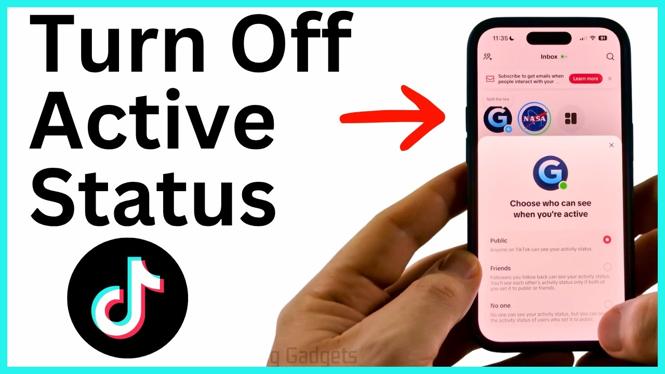
TikTok can show an activity indicator so other people can tell when you are active. You can turn that indicator off from the Inbox screen. The setting takes only a few taps, and selecting No one disables your active status.
This works in the TikTok app on an iPhone, Android phone, or tablet. After the change loads, the indicator beside Inbox changes from green to gray.
Video Tutorial
Turn off your TikTok active status
- Open the TikTok app.
- Select Inbox in the bottom menu.
- Look at the top of the Inbox screen, near Inbox. If your active status is on, you may see a green dot.
- Select the dot to open the setting that controls who can see when you are active.
- Select No one.
- Wait a moment for TikTok to load the change. You can then close the setting.
When the setting is off, the dot near Inbox should appear gray instead of green. That shows TikTok has disabled your active status.
What to select in the activity setting
The setting gives you control over who can see that you are active. If you want to limit visibility instead of fully disabling it, you can select Friends. This keeps the activity setting limited to friends.
To hide your activity status completely, select No one. This is the option to use if you do not want people to see when you are active on TikTok. You can still use the app, browse content, and use Inbox after changing this setting.
The green dot is the quick way to check the current status from the Inbox screen. A green dot means the active-status option is currently enabled. After you choose No one and the change finishes loading, the dot turns gray.
If you do not see a green dot
You may not see a green dot near Inbox. That can mean the active status is already disabled. Check the dot shown at the top of the Inbox screen. If it is gray, your active status has been turned off.
If the dot is available but does not change immediately after selecting No one, give TikTok a little time to load the setting. Then close the setting and check the dot again. A gray dot confirms the change shown in the app.
Change the setting again later
You can return to this control any time from Inbox. Select the dot near the Inbox label to review who can see when you are active. Choose Friends if you want to allow friends to see that status again, or choose No one to keep it disabled.
This makes the Inbox screen the place to check whenever you want to adjust your TikTok activity visibility. You do not need to change how you browse TikTok or how you use messages. The only choice you need to make is who, if anyone, can see that you are active.
Quick check after disabling active status
- Open Inbox from the bottom menu.
- Check the dot beside the Inbox label.
- Confirm that the dot is gray.
- If needed, select the dot and make sure No one is selected.
Once the dot is gray, your TikTok active status is off. You can leave the Inbox screen and continue using the app normally.
More TikTok Tips & Tutorials:
 Subscribe Now! 🙂

Discover more from Gauging Gadgets
Subscribe to get the latest posts sent to your email.