Make Your TikTok Following List Private
Your TikTok profile can show the accounts you follow through your Following list. If you do not want other people to see that list, change the Following list privacy setting to Only me.
This setting applies to the list of accounts you follow. After you change it, you remain able to view your own Following list, but other TikTok users cannot see it.
Video Tutorial
Hide Your Following List on TikTok
- Open the TikTok app on your iPhone or Android device.
- Go to your Profile.
- Select the three lines in the top-right corner to open the TikTok menu.
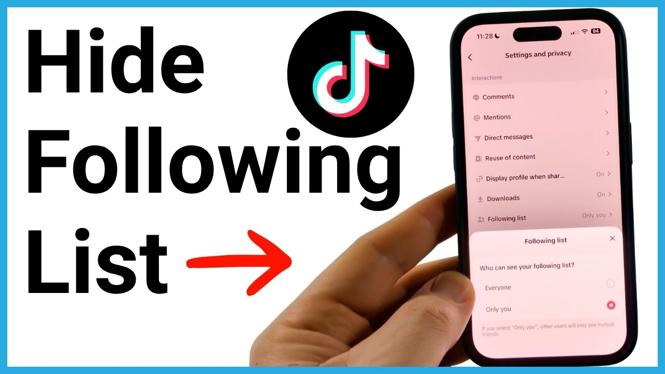
- Tap Settings and privacy.
- Scroll down to the Interactions section.
- Select Following list.
- Choose Only me.
That is all you need to do. TikTok saves the change when you select Only me, so you can close the settings screen and return to your profile.
What the Following List Setting Changes
Your Following list is the list of TikTok accounts that you follow. It is separate from your videos, profile bio, likes, and other account settings. Changing this option only controls who can view the accounts in your Following list.
When the setting is set to Everyone, other people on TikTok can view the accounts you follow. When you switch it to Only me, your Following list becomes private. You are the only person who can see which accounts you follow.
This can be useful if you want more control over the activity shown from your profile. You do not need to unfollow anyone or change your account just to hide the list. The accounts you follow stay the same. Only the visibility of the list changes.
Check That the Setting Is Private
If you want to verify the change, return to Profile, open the three-line menu, and go back to Settings and privacy. Under Interactions, select Following list again.
The selected option should be Only me. If it is set to Everyone, select Only me again. This is the setting that prevents other users from viewing the accounts you follow.
Change It Back Later
You can change this setting whenever you want. Go back to Settings and privacy, scroll to Interactions, and select Following list. From there, choose the visibility option you want to use.
If you decide to make your Following list visible again, selecting Everyone allows other TikTok users to see the accounts you follow. If you prefer to keep that information private, leave the setting on Only me.
Quick Privacy Reminder
Hiding your Following list does not remove the accounts you follow, and it does not stop TikTok from showing your own list to you. It changes what other people can see from your account.
For the most private setting shown here, use Only me. Once it is selected, no one else on TikTok can view your Following list.
More TikTok Tips & Tutorials:
 Subscribe Now! 🙂

Discover more from Gauging Gadgets
Subscribe to get the latest posts sent to your email.