Copy Your TikTok Profile URL From Your Profile
Your TikTok profile URL is the direct web address for your account. When someone opens it, they go straight to your TikTok profile instead of searching for your username.
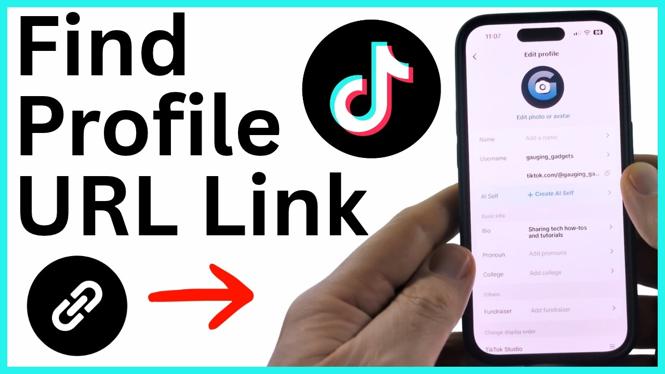
You can find this link inside the TikTok app. TikTok shows it below your username in the profile editing area, where you can copy it and paste it into a message, bio, or another social media profile.
Video Tutorial
How to Find Your TikTok Profile URL Link
- Open the TikTok app on your iPhone or Android device.
- Select Profile in the bottom menu. This opens your own TikTok profile.
- Select the small pencil icon in the top-left corner to open your profile editing area.
- Find your username.
- Look directly below your username to see your TikTok profile URL.
- Select the copy symbol to the right of the URL.
- Paste the copied link wherever you want to share your TikTok account.
After you select the copy symbol, the profile URL is saved to your device clipboard. You can then paste it into a text message, social media post, profile bio, email, or notes app.
What Happens When Someone Uses Your Link
Your profile URL points directly to your TikTok profile. Anyone who selects the link can open your account page and see the content available on your profile.
This is more useful than telling someone to search for your account name. A search can return similar usernames, misspellings, or unrelated accounts. Your copied profile URL sends people to the specific account you chose.
Before sharing the link, check that you are on the correct TikTok profile. This is especially important if you use more than one account. The username shown in the profile editing area identifies the account connected to the URL you are about to copy.
Build Your TikTok URL From Your Username
You can also create your TikTok profile URL when you know your exact username. The standard profile address uses this format:
https://www.tiktok.com/@yourusername
Replace yourusername with the username shown on your TikTok profile. For example, if your username is samplecreator, your profile URL would use @samplecreator at the end of the address.
Copying the URL from TikTok is still the safest option. It prevents mistakes with spelling, numbers, periods, underscores, or other characters in your username. If you build the address manually, compare it with the username in your profile editing area before sharing it.
Where to Paste Your TikTok Profile Link
Once you copy your TikTok profile URL, you can paste it anywhere that accepts a web address. Common places include a message to a friend, a social media bio, a post caption, an email, or a notes app for later use.
To paste the link, open the app or text field where you want it to appear. Press and hold in the field, then choose the paste option on your device. The full TikTok profile URL should appear in the field. You can send or save it as you normally would.
If you plan to share the link often, keeping a copy in your notes app can be helpful. That gives you a quick backup if you need your profile address later. Remember that your URL is tied to the username shown on your profile, so check it again after making any username changes.
If You Cannot Find the Profile URL
Start by returning to Profile from the bottom menu. Then open the profile editing area with the pencil icon and look below your username. That is where the app displays the profile URL and the copy symbol.
Do not copy a link from someone else’s profile by mistake. Check the username first, then select the copy symbol beside the URL shown for your own account. Once pasted, opening the link should take people directly to your TikTok profile.
More TikTok Tips & Tutorials:
 Subscribe Now! 🙂


Discover more from Gauging Gadgets
Subscribe to get the latest posts sent to your email.