How to Scan YouTube QR Code On TV
Using YouTube on your TV can be a great experience, whether you’re watching your favorite shows, following music channels, or discovering new content. However, logging into your YouTube account can be cumbersome, particularly when you’re using a remote. Fortunately, there’s a simple solution: scanning a YouTube QR code from your TV to link your phone directly. This tutorial will guide you through the process step-by-step, making your YouTube viewing experience smoother and more enjoyable.
Video Tutorial
Why You Might Be Looking for This Tutorial
Many users find themselves frustrated with the slow and tedious process of entering their YouTube credentials using a remote control. The QR code feature provides an efficient alternative, allowing you to quickly connect your mobile device to your TV without the hassle of typing. If you’re looking for a faster way to enjoy your personalized content, this tutorial will help you streamline the login process and enhance your overall viewing experience.
Steps to Scan YouTube QR Code on TV
- Turn On Your TV: Switch on your Smart TV, Roku, Fire Stick, Apple TV, or gaming console and navigate to the YouTube app.
- Open YouTube: Ensure that you have the YouTube app open and ready to use.
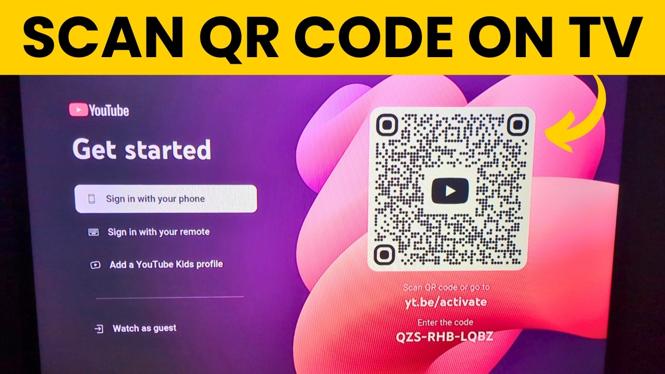
- Access the QR Code: On the YouTube app, look for the option to sign in. You will be presented with a QR code on the screen.
- Use Your Mobile Device: Grab your smartphone and open the YouTube app. Make sure you are logged into the account you want to link.
- Scan the QR Code: In the YouTube app on your phone, select the option to link devices. Use your phone’s camera to scan the QR code displayed on your TV screen.
- Confirmation: After scanning, confirm any prompts that appear on your TV and mobile device. Your phone will now be connected to your YouTube account on the TV.
- Enjoy Your Content: You can now enjoy YouTube on your TV without having to enter your credentials manually.
Conclusion
Scanning the YouTube QR code on your TV is a hassle-free way to enjoy your favorite content without the annoying process of typing on your remote. By following the steps outlined in this tutorial, you can link your mobile device to your TV in a matter of seconds. This method not only saves time but also enhances your overall viewing experience, allowing you to focus on what matters most: enjoying great content!
More YouTube Tips & Tutorials:
 Subscribe Now! 🙂

Discover more from Gauging Gadgets
Subscribe to get the latest posts sent to your email.