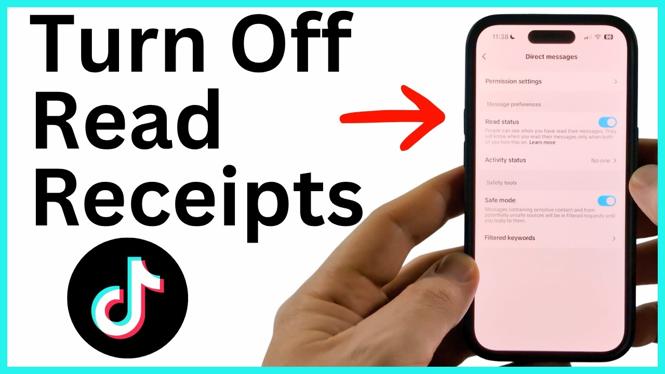
TikTok read receipts can show a sender that you opened their direct message. If you prefer to read DMs without displaying a Seen status, turn off the Read status setting in the TikTok app.
The setting is available from your TikTok privacy options. The same steps work on iPhone and Android because you change the option inside the TikTok app, not in your phone settings.
Video Tutorial
Turn off TikTok read receipts
You only need to change one setting. Start from your profile, then open the menu and go to your direct message settings.
- Open the TikTok app.
- Go to your Profile.
- Select the three lines in the top-right corner to open the menu.
- Select Settings and privacy.
- Scroll down to the Interaction section.
- Select Direct messages.
- Turn off Read status.
Give TikTok a moment to save the change. You can then leave the settings screen. Your read receipts are disabled.
What turning off Read status changes
Read status controls whether your TikTok direct messages show that you read them. With the setting turned off, people you message cannot see when you have viewed the DMs they sent to you.
This is useful when you want time to consider a message before replying. You can open a conversation and read its messages without telling the sender exactly when you opened them. Turning off the setting does not stop messages from arriving, remove existing conversations, or prevent you from sending replies.
The change applies to your TikTok account. You do not need to adjust each individual chat separately. If you later decide you want read receipts back, return to Settings and privacy, open Direct messages under Interaction, and turn Read status back on.
Check that the setting is off
The quickest way to verify the change is to return to the Direct messages screen after switching it off. The Read status control should remain disabled. If it does, TikTok has saved your preference.
If the setting does not appear to change right away, wait a few seconds before leaving the page. Then reopen the menu from your profile and check the setting again. Make sure you are changing the option in the TikTok account you use for direct messages, especially if you have more than one account signed in on the same phone.
Turn read receipts back on later
You can reverse this at any time. Follow the same path: open your Profile, select the three lines, choose Settings and privacy, scroll to Interaction, and select Direct messages. Turn Read status on when you want your read activity to be visible again.
There is no separate save button shown in these steps. After you toggle Read status, allow the app a moment to apply the change before closing settings.
Quick path to remember
For future reference, the setting path is Profile > three lines > Settings and privacy > Interaction > Direct messages > Read status.
Keep Read status off when you do not want TikTok DMs to show that you have read a message. Turn it on again only if you want senders to see your read status.
More TikTok Tips & Tutorials:
 Subscribe Now! 🙂

Discover more from Gauging Gadgets
Subscribe to get the latest posts sent to your email.