Check the image before you trust it
AI-generated images can look convincing at a glance. A photo may have realistic lighting, sharp details, and a believable subject, but small mistakes can reveal that it was made with AI. Start by inspecting the image yourself. Then use a free checker when the visual clues are not enough.
No single method proves that every image is real or AI-generated. Some images include embedded information that a tool can detect, while others do not. Combining a close visual review with the checks below gives you a better basis for deciding whether to trust or share a suspicious photo.
Video Tutorial
Look closely for visual mistakes
Before uploading anything to a checker, zoom in and examine the parts of an image that AI often gets wrong. Do not focus only on the main subject. Check the background, signs, vehicles, and objects around the edges too.
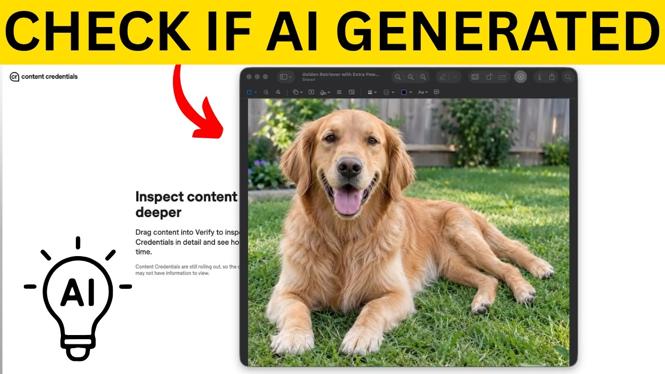
- Count limbs and body parts. Look at hands, feet, legs, ears, tails, and fingers. In the example of a golden retriever, the dog appears to have three back legs. A quick glance could mistake one of them for a tail, but closer inspection shows the anatomy is wrong.
- Read all visible text. AI images often create letters that look almost correct but are backward, scrambled, incomplete, or made of nonsensical characters. Check storefronts, banners, license plates, posters, and clothing logos.
- Check recognizable brands and signs. A busy location such as Times Square should usually contain familiar brand names and readable advertising. If the signs look close to real brands but do not quite match, the image may be AI-generated.
- Examine traffic and object placement. Look for cars driving in the wrong direction, vehicles facing each other in an impossible way, duplicated objects, or items that do not fit the scene.
- Look for details that feel too uniform or out of place. Repeated patterns, strange shapes, and oddly placed objects are worth checking. One mistake alone may not settle the question, but several errors are a strong warning sign.
Check the file with Content Authenticity Verify
Some AI image tools add information to the image file when they create it. Content Authenticity Verify can inspect a file for that information. This is especially useful when an image looks realistic and you cannot find a visible mistake.
- Open verify.contentauthenticity.org.
- Select the image file you want to check and add it to the website.
- Wait while the tool examines the image for embedded information.
- Review the result. If the tool identifies the image as AI-generated, it may also tell you which tool generated it.
A positive result is useful evidence that the image was created with AI. Still, treat the result carefully. Embedded information can be removed or avoided, so a result without a match does not prove that a photo is real.
Ask Google Gemini about the image
Google Gemini can also evaluate an uploaded image. Images created by Gemini can contain information embedded in their pixels. That makes this check particularly helpful for identifying images that were made with Google Gemini.
- Open Google Gemini.
- Upload the image you want to check.
- Ask Is this AI?
- Send your message and review Gemini’s response.
When Gemini finds records confirming that it made the image, it can identify the image as AI-generated and state that Google made it. This is a strong result for that specific type of image because the information is embedded in the pixels and is difficult to remove.
Use the results together
Start with the image itself. Check anatomy, text, brands, traffic, and background details. If the image still seems plausible, run the original file through Content Authenticity Verify. You can also upload it to Google Gemini and ask if it is AI.
Keep in mind that not every AI image will have detectable embedded information. A clean result from either tool is not a guarantee that the image is authentic. If the photo is important, suspicious, or being used to support a claim, avoid treating it as reliable based on appearance alone. Check where it came from and be careful before sharing it.
More tutorials
 Subscribe Now! 🙂
Discover more from Gauging Gadgets
Subscribe to get the latest posts sent to your email.