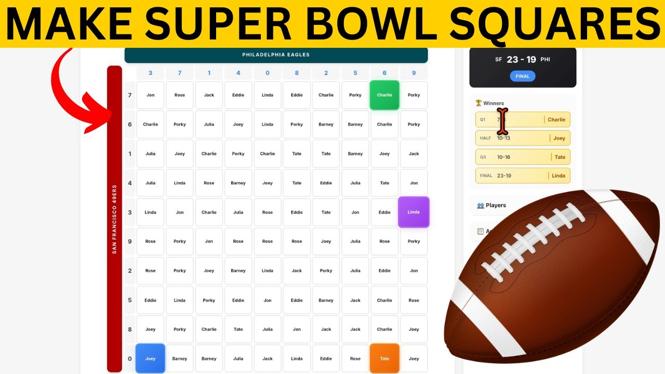
How to Make Super Bowl Squares Game Online for FREE
The Super Bowl is one of the biggest events in American sports, and hosting a Super Bowl party can be a thrilling experience. One popular activity during the game is playing the Super Bowl Squares game. This friendly betting game adds excitement to the match as participants can win prizes based on the game’s score. In this tutorial, I will guide you through the process of creating your own Super Bowl squares game online for free. No need to download any apps or spend a dime – just follow these simple steps to set up your game, randomize the numbers, and share it with your friends and family. Let’s dive in!
Video Tutorial
Why You Might Be Looking for This Tutorial
If you’re planning a Super Bowl party, you may want to add an extra layer of excitement to the festivities. Here are a few reasons why you might be searching for a way to create a Super Bowl Squares game:
- Engagement: It enhances the social experience of watching the game. Guests can participate even if they are not football fans.
- Easy Setup: You want a hassle-free way to organize the game without dealing with complicated software or physical boards.
- No Cost: You prefer a free method to set up the game, allowing all your guests to join without any financial burden.
- Remote Participation: You want to include friends and family who can’t attend the party by easily sharing the game online.
Steps to Create Your Super Bowl Squares Game Online
- Choose a Platform: Select a website that offers Super Bowl squares game creation for free. Some popular options include Squarespace, RunYourPool, and PoolHost.
- Create Your Game: Follow the instructions on the platform to set up your game. You usually need to enter details like the game date and the number of squares in your grid (typically 10×10).
- Randomize the Numbers: Most platforms will have a feature to randomize the numbers for the grid automatically. This step is crucial as it adds an element of chance to the game.
- Share with Participants: Once your squares are set, you can share the game link with your friends and family. Ensure they understand how the game works and how they can select their squares.
- Keep Track of Scores: As the game progresses, monitor the scores and keep track of winners at each quarter. Some platforms may offer tools to help with this, making it easy to announce the winners.
With these simple steps, you can create an engaging and exciting Super Bowl Squares game for your party. This fun activity will enhance the viewing experience and keep everyone involved throughout the game. Enjoy the Super Bowl and good luck!
More Football Squares Tutorials:
 Subscribe Now! 🙂

Discover more from Gauging Gadgets
Subscribe to get the latest posts sent to your email.