How to Increase Volume on iPhone without Buttons
There may be times when the physical volume buttons on your iPhone are not functioning correctly or have broken entirely. This can make adjusting your volume frustrating, especially if you’re trying to enjoy music or video content. Fortunately, there are alternative methods available to increase the volume on your iPhone without relying on the physical buttons. In this tutorial, we will guide you through different techniques to manage your iPhone’s volume settings seamlessly.
Video Tutorial
Why You Might Be Looking for This Tutorial
Many iPhone users find themselves in situations where the volume buttons are either damaged or simply not responding. This can happen due to wear and tear, exposure to moisture, or accidental drops. Instead of panicking, you can rely on alternative methods to control the volume. This guide will help you regain control over your device’s audio settings without the need for repairs or replacements. Whether you’re in a quiet environment and need to lower the volume or in a noisy place and want to crank it up, this tutorial is for you.
Steps to Increase Volume on iPhone without Buttons
Method 1: Using the Control Center
- Swipe down from the upper-right corner of the screen (for iPhone X and later) or swipe up from the bottom (for iPhone 8 and earlier) to access the Control Center.
- Locate the volume slider, which is represented by a speaker icon.
- Drag the slider up to increase the volume or down to decrease it as per your requirement.
Method 2: Using Settings App
- Open the Settings app on your iPhone.
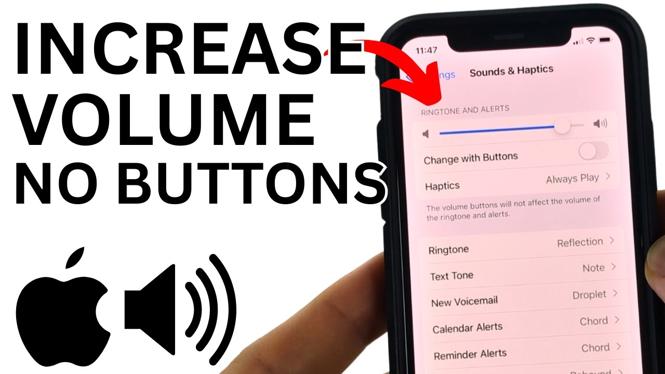
- Scroll down and tap on Sounds & Haptics.
- Under the ‘Ringer and Alerts’ section, you will see a slider for volume control.
- Adjust the slider to increase or decrease the volume as needed.
Method 3: Siri Voice Commands
- Activate Siri by saying “Hey Siri” or pressing and holding the side button.
- Give a command like “Increase volume” or “Lower volume”.
- Siri will adjust the volume according to your request.
Conclusion
In conclusion, knowing how to increase the volume on your iPhone without using the buttons can be a lifesaver in various situations. Whether you prefer using the Control Center, adjusting settings through the app, or leveraging Siri, these methods ensure that you can enjoy your media uninterrupted. Should you encounter any further issues with your volume buttons, it might be a good idea to consider seeking repair options.
More iPhone Tips & Tutorials:
 Subscribe Now! 🙂

Discover more from Gauging Gadgets
Subscribe to get the latest posts sent to your email.