How to DELETE Facebook Account: A Step-by-Step Guide
In today’s digital age, maintaining your privacy online has become increasingly important. If you’re looking to take control of your personal information, deleting your Facebook account may be an essential step. Whether you’re concerned about data privacy, want to reduce your social media presence, or simply need a break from Facebook, this guide will walk you through the process of permanently deleting your account, regardless of your device. By following these straightforward steps, you can ensure that your data is removed from Meta completely.
Why You Might Be Looking For This Tutorial
Many individuals are becoming more aware of their online privacy rights and the importance of protecting their personal information. Here are some reasons why you might want to delete your Facebook account:
- You want to minimize your digital footprint.
- Concerns about data sharing and privacy policies.
- You no longer use Facebook or prefer other social media platforms.
- To reduce distractions and focus on real-life interactions.
Steps to Permanently Delete Your Facebook Account
Ready to delete your Facebook account? Follow these steps to ensure a smooth process:
- Log into Your Facebook Account: Using your web browser or the Facebook app, enter your credentials to access your account.
- Go to Settings: Click on the downward-facing arrow at the top right corner of the page (or tap on the menu icon in the app). Select “Settings & Privacy,” then “Settings.”
- Access Your Facebook Information: On the left-hand menu, click on “Your Facebook Information.”
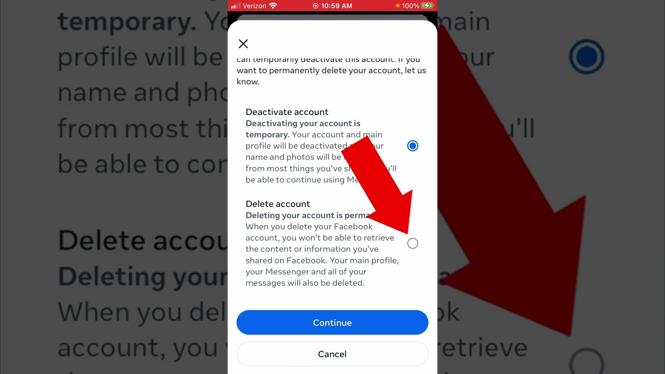
- Delete Your Account: Look for the option that says “Deactivation and Deletion.” Here, choose “Permanently Delete Account” and click “Continue to Account Deletion.”
- Follow the Prompts: You may be asked to provide a reason for leaving. Follow the prompts until you reach the final confirmation page.
- Confirm Deletion: Click on “Delete Account.” Your account will then be scheduled for deletion, and you will have a 30-day grace period to change your mind.
Video Tutorial
Following these steps will help you take control of your online presence and ensure that your information is deleted from Facebook’s servers. Remember, before you delete your account, it might be beneficial to download your data if you wish to keep any memories or important information that you have shared on the platform.
More Facebook Tips & Tutorials:
 Subscribe Now! 🙂

Discover more from Gauging Gadgets
Subscribe to get the latest posts sent to your email.