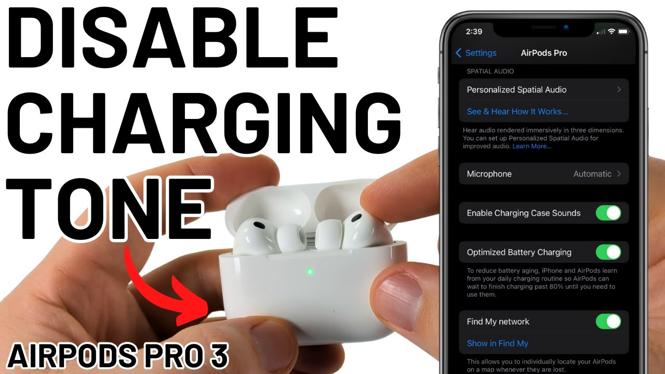
How to Turn OFF AirPods Pro 3 Charging Case Sound
If you own a pair of AirPods Pro 3, you may have noticed the sound that your charging case makes when you plug it in or place it on a wireless charger. While some users find this tone charming, others may find it annoying or simply too loud for their liking. If you’re looking for a way to silence this sound, you’re in the right place. In this tutorial, we will guide you through the steps to turn off the charging case sound on your AirPods Pro 3, helping you enjoy a quieter charging experience.
Video Tutorial
Why You Might Be Looking for This Tutorial
Many users who seek to disable the charging sound on their AirPods Pro 3 do so for various reasons. Here are a few scenarios where this guide may be particularly helpful:
- Peace and Quiet: If you use your AirPods in shared spaces or quiet environments, keeping the charging sound to a minimum can help maintain the peace.
- Late-Night Charging: Charging your AirPods overnight? You may not want to disturb others in your household with the loud charging sound.
- Simplicity: Some individuals prefer to streamline their technology. Disabling unnecessary sounds can contribute to a more minimalist experience.
Steps to Turn OFF AirPods Pro 3 Charging Case Sound
Follow these straightforward steps to turn off the charging case sound on your AirPods Pro 3:
- Connect Your AirPods: Ensure that your AirPods Pro 3 are connected to your iPhone or iPad.
- Open the Settings App: Navigate to the Settings app on your device.
- Select Bluetooth: Tap on the Bluetooth option in the settings menu.
- Find Your AirPods: Locate your AirPods Pro 3 in the list of devices and tap the info icon (i) next to them.
- Access the Options: Scroll down to find the ‘Charging Case Sound’ setting.
- Disable the Sound: Toggle the option to turn off the charging case sound.
- Test It Out: Plug in your charging case to ensure that the sound has been successfully disabled.
By following these steps, you can customize your AirPods experience and enjoy a more peaceful environment while charging. If you find yourself having any issues or have further questions, feel free to leave a comment. Your feedback is appreciated, and we’re here to help!
More AirPods Tips & Tutorials:
 Subscribe Now! 🙂

Discover more from Gauging Gadgets
Subscribe to get the latest posts sent to your email.