Find your recently watched Reels
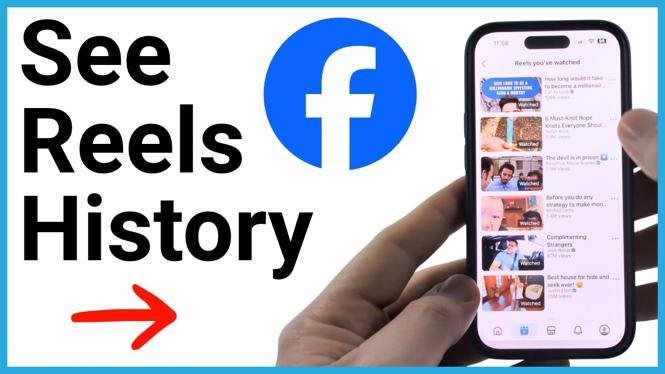
If you scrolled past a Facebook Reel and want to see it again, you can check your Reels history in the Facebook app. The history list lets you browse Reels you watched recently, open one again, and share it without trying to find it in your feed.
This works from the Facebook app on an iPhone, Android phone, or Samsung phone. You start by opening Reels, then use the profile area within the Reels screen to access History.
Video Tutorial
How to see Reels history on Facebook
- Open the Facebook app on your phone.
- Select the Reels icon in the bottom menu. This opens the Reels feed.
- Look for the small person icon in the top-right corner of the Reels screen.
- If you do not see the person icon, tap the Reel that is playing. The icon should then appear.
- Select the person icon.
- Choose History.
- Scroll through the list to see Reels you have recently watched.
Each item in this list is a Reel you can revisit. Tap a Reel to open it and play it again. This is useful when you remember part of a video but did not save it before moving on to another Reel.
Open or share a Reel from your history
Your Reels history is not only for checking what you watched. You can also use it to return to a Reel you want to send to someone else.
- Open History from the person icon in the Reels screen.
- Find the Reel you want in the recently watched list.
- Tap the Reel to view it again.
- To share it, select the three dots next to the Reel.
- Select Share Video.
Using the three-dot menu from the history list can save time when you only need to share the Reel. You do not need to keep scrolling through the Reels feed and hope Facebook shows the same video again.
If you cannot see the person icon
The person icon is the part of this process that can be easy to miss. It appears in the top-right corner while you are in Reels. If the video controls or icons are hidden, tap directly on the Reel first. That should make the icon visible so you can select it.
Make sure you are in the Reels section of the Facebook app before looking for it. Start with the Reels icon in the bottom menu, then open the person icon from the Reels screen. After that, select History to get to your recently watched Reels.
When Reels history is useful
Facebook Reels move quickly, and it is common to lose a video after accidentally swiping away from it. Your history gives you a place to check when you want to replay a recipe, revisit a product video, hear a song again, or send a funny Reel to a friend.
It also helps when you meant to save or share a Reel but did not do it at the time. Instead of searching for the creator or trying to reproduce what you typed in the search bar, open your history and browse the Reels you watched recently.
Once you find the right Reel, tap it to watch it again. If you need to send it to someone, use the three dots next to the item and select Share Video.
Quick path to remember
The path is simple: open Facebook, select Reels, tap the person icon, and choose History. From there, scroll through your recently watched Reels, open one to replay it, or use the three-dot menu to share it.
More Facebook Tips & Tutorials:
 Subscribe Now! 🙂


Discover more from Gauging Gadgets
Subscribe to get the latest posts sent to your email.