How to Convert Image to PDF File FREE
In today’s digital age, the ability to convert images to PDF files is a valuable skill. Whether you’re a student needing to compile images for a project, a professional preparing a presentation, or simply someone who wants to preserve memories in a versatile format, knowing how to convert an image to PDF can save you time and hassle. Fortunately, with tools like PDFGadget, this process can be done easily and at no cost, allowing you to create professional-quality PDFs from various image formats such as JPG, PNG, BMP, and WEBP directly online without the need to download any software.
Video Tutorial
Why You Might Be Looking for This Tutorial
There are several reasons you might be seeking out a tutorial on how to convert images to PDF files for free:
- Convenience: Online tools allow you to convert files without the need for downloads or installations, making it simple to use from any device.
- Cost-Effective: Many paid converters exist, but free options like PDFGadget can get the job done without any expense.
- Multiple Formats Supported: If you have images in different formats, such as JPG or PNG, a versatile converter can accommodate your needs.
- Professional Output: PDF documents are often required for professional documents, and converting images into this format ensures your work is presented in a polished manner.
Steps to Convert Image to PDF Using PDFGadget
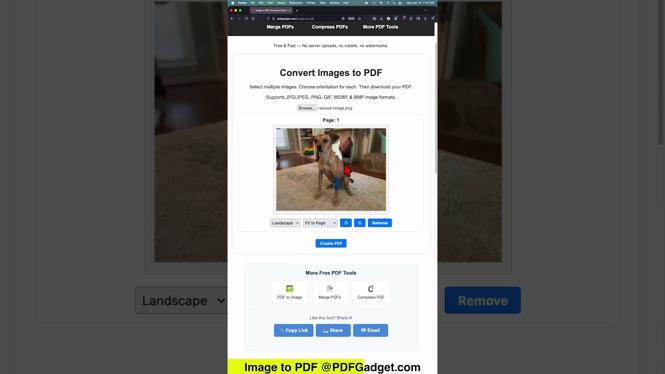
- Visit PDFGadget: Open your web browser and navigate to the PDFGadget website.
- Select “Image to PDF”: Look for the option that allows you to convert images to PDF, usually labeled clearly on the homepage.
- Upload Your Image: Click on the upload button to select the image file you want to convert from your device.
- Choose Settings (if necessary): Depending on the tool, you may have options to adjust the type of PDF or settings related to resolution.
- Click “Convert”: Once your image is uploaded and settings are confirmed, click the convert button to process the image.
- Download Your PDF: After the conversion is complete, retrieve your newly created PDF file, ready for use.
By following these straightforward steps, you can easily convert any image into a PDF file for free, making document management and sharing hassle-free.
More PDF Tools & Tutorials:
 Subscribe Now! 🙂

Discover more from Gauging Gadgets
Subscribe to get the latest posts sent to your email.