Gauging Gadgets

  • Home
  • Gadget Reviews
    • Automotive Accessories
    • Bluetooth Devices
    • Cameras & Accessories
    • Cellphones and Accessories
    • Computers & Accessories
    • Drones & Quadcopters
    • Gaming Headsets
    • Headphones
    • Household
    • Lights
      • Camping Light
      • Flashlights
    • Power Banks
    • Routers and Modems
    • Smart Home
    • Smartwatch
      • Garmin
    • Solar
    • Tools
    • Wireless Speakers
  • Tech Tutorials
    • Android
    • Content Creators
      • Hitfilm
      • Instagram
      • Mixer
      • OBS Studio
      • Twitch
      • YouTube
    • DIY
    • Firefox
    • Garmin
      • Fenix 6
      • Forerunner 245
      • Forerunner 45
      • Forerunner 645
      • Garmin Instinct
      • Venu
      • Vivoactive 3
      • Vivoactive 4
    • Gadget Tutorials
      • Garmin
        • Fenix 6
        • Forerunner 45
        • Forerunner 245
        • Forerunner 645
        • Garmin Instinct
        • Venu
        • Vivoactive 3
        • Vivoactive 4
      • Google Home
      • Google Chromebook
      • Xbox One
    • Google
      • Google Chrome
      • Google Chromebook
      • Google Drive
      • Google Home
      • Google Maps
    • Internet
    • iPhone
    • Kindle
    • Live Streaming Platforms
      • Twitch
      • OBS Studio
      • Mixer
    • Netflix
    • Voice Assistants
    • Social Media
      • Instagram
      • Reddit
      • LinkedIn
      • YouTube
    • Spotify
    • Windows 10
    • Xbox One
    • YouTube
  • My YouTube Setup!
Menu
Expand search form

Live Streaming Platforms, OBS Studio, Tech Tutorials

Remove OBS Webcam Background Without Green Screen
January 25, 2022 No Comments
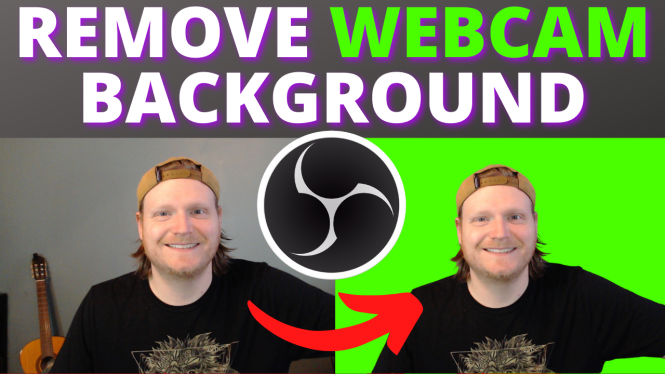
Remove Webcam Background Without a Green Screen -

How to remove camera background in OBS without a green screen? In this OBS Studio tutorial, I show you how to remove your background without a green screen in OBS. This means you can have Zoom custom backgrounds in OBS Studio. Let me know in […]

Continue Reading

Live Streaming Platforms, OBS Studio, Tech Tutorials, Twitch

How to Stream on Twitch with OBS Studio

July 15, 2021 No Comments

How to livestream on Twitch with OBS? In this tutorial, I show you how to start a Twitch stream with OBS Studio. Streaming to Twitch with OBS is very easy and can be done in less than 10 minutes. OBS Studio is a free, open […]

Continue Reading

LinkedIn, Live Streaming Platforms, OBS Studio, Restream, Social Media, Tech Tutorials, Twitch, YouTube

How to Multistream on OBS for Free?

December 6, 2020 4 Comments
Stream To Multiple Platforms with OBS for FREE

How to Multistream on OBS for Free? In this tutorial, I show you how to livestream to multiple platforms at the same time on OBS Studio for free with Restream. This means you can live stream to Facebook, Twitch, YouTube, and many other platforms at […]

Continue Reading

Live Streaming Platforms, OBS Studio, Tech Tutorials

How to Export Scenes in OBS Studio – Import Scene Collections Tutorial

October 14, 2019 No Comments
export OBS studio scenes tutorial how to import

Trying to export your OBS scenes? In this tutorial, I show you how to easily export or import OBS Studio scenes. This can be useful if you are trying to back up your OBS scenes or if you need to transfer your OBS Scenes and […]

Continue Reading

Live Streaming Platforms, OBS Studio, Tech Tutorials

Fix OBS Black Screen Issue with Nvidia GPU

August 3, 2019 No Comments

Is your OBS showing a black or blank screen for Display Capture or Game Capture? In this tutorial, I show you how to easily fix this glitch. Typically the OBS black screen glitch is caused by the Nvidia GPU settings. Downloading the latest graphics card […]

Continue Reading

Live Streaming Platforms, OBS Studio, Tech Tutorials

Fix Audio Out of Sync in OBS Studio

August 1, 2019 No Comments

Fix audio delays in OBS Studio. Is your audio out of sync with your video or webcam in OBS Studio?  This includes your voice not syncing with your webcam. In this tutorial, I show you how to you can fix sound delays or sync issues […]

Continue Reading

Subscribe via Email

Enter your email address to subscribe to this blog and receive notifications of new posts by email.

Join 47 other subscribers

Recent Post

  • February 11, 2026

    How to Cancel Uber One Subscription in Uber Eats app

  • February 11, 2026

    How to Enter Safe Mode on Lenovo PC or Laptop

  • February 10, 2026

    How to Stop Power Button Opening Gemini on Samsung Phone

  • February 10, 2026

    How to Change Keyboard Size on Android

  • February 9, 2026

    How to Deactivate or Delete Facebook Account

More Tech Tutorials

  • September 21, 2022

    How to Turn Off Safe Search on iPhone

  • February 2, 2023

    How to Enable Sensitive Content on Telegram

  • November 27, 2025

    How to Use Live Translation with AirPods Pro 2

  • August 20, 2019
    Custom Text Responses Garmin Instinct Tutorial

    Custom Text Responses – Garmin Instinct Tutorial

  • December 4, 2023

    How to Fix Liked Videos on TikTok Not Showing Up

  • November 17, 2025

    How to Fix Low Volume on AirPods Pro 3

  • October 23, 2019
    View Any LinkedIn Profile Anonymously - No LinkedIn Login Required - Linkedin Tutorial

    View Any LinkedIn Profile Anonymously – No LinkedIn Login Required – Linkedin Tutorial

  • August 26, 2025

    How to Automatically Move Emails to Specific Folder in Outlook

  • October 12, 2025

    How to Change Name on TikTok

Privacy Policy

FTC: This page contains affiliate links. As an Amazon Associate I earn from qualifying purchases. All reviews are 100% honest and are not influenced to promote sales. Thank you for visiting and I hope you found it useful!

International Amazon Links:

  • Australia
  • UK
  • Canada
  • Spain
  • Mexico
  • Italy
  • France
  • Germany
  • USA
  • Opt-out preferences
  • Imprint
  • Disclaimer
  • Privacy Policy

Gauging Gadgets

Gadget Reviews & Tech Tutorials

Close Menu
    Manage your privacy

    We use cookies to improve your experience. Accepting them lets us process data like browsing behavior. You can withdraw consent anytime, but some features may not work properly.

    Functional Always active
    The technical storage or access is strictly necessary for the legitimate purpose of enabling the use of a specific service explicitly requested by the subscriber or user, or for the sole purpose of carrying out the transmission of a communication over an electronic communications network.
    Preferences
    The technical storage or access is necessary for the legitimate purpose of storing preferences that are not requested by the subscriber or user.
    Statistics
    The technical storage or access that is used exclusively for statistical purposes. The technical storage or access that is used exclusively for anonymous statistical purposes. Without a subpoena, voluntary compliance on the part of your Internet Service Provider, or additional records from a third party, information stored or retrieved for this purpose alone cannot usually be used to identify you.
    Marketing
    The technical storage or access is required to create user profiles to send advertising, or to track the user on a website or across several websites for similar marketing purposes.
    Statistics

    Marketing

    Features
    Always active

    Always active
    • Manage options
    • Manage services
    • Manage {vendor_count} vendors
    • Read more about these purposes
    Manage options
    • {title}
    • {title}
    • {title}
    Manage your privacy

    To provide the best experiences, we and our partners use technologies like cookies to store and/or access device information. Consenting to these technologies will allow us and our partners to process personal data such as browsing behavior or unique IDs on this site and show (non-) personalized ads. Not consenting or withdrawing consent, may adversely affect certain features and functions.

    Click below to consent to the above or make granular choices. Your choices will be applied to this site only. You can change your settings at any time, including withdrawing your consent, by using the toggles on the Cookie Policy, or by clicking on the manage consent button at the bottom of the screen.

    Functional Always active
    The technical storage or access is strictly necessary for the legitimate purpose of enabling the use of a specific service explicitly requested by the subscriber or user, or for the sole purpose of carrying out the transmission of a communication over an electronic communications network.
    Preferences
    The technical storage or access is necessary for the legitimate purpose of storing preferences that are not requested by the subscriber or user.
    Statistics
    The technical storage or access that is used exclusively for statistical purposes. The technical storage or access that is used exclusively for anonymous statistical purposes. Without a subpoena, voluntary compliance on the part of your Internet Service Provider, or additional records from a third party, information stored or retrieved for this purpose alone cannot usually be used to identify you.
    Marketing
    The technical storage or access is required to create user profiles to send advertising, or to track the user on a website or across several websites for similar marketing purposes.
    Statistics

    Marketing

    Features
    Always active

    Always active
    • Manage options
    • Manage services
    • Manage {vendor_count} vendors
    • Read more about these purposes
    Manage options
    • {title}
    • {title}
    • {title}